
Most people who find a tradesperson online make up their mind within seconds. They want to know three things straight away: do you do the job they need, do you cover where they live, and can they trust you? A good trade website answers all three before the visitor has to scroll, then makes it effortless to get in touch.
Here are the 12 essentials we build into every trade website, and why each one matters.
Start with what visitors see first
Most of your visitors will be on a phone. The top part of the screen, before they scroll, does most of the work.
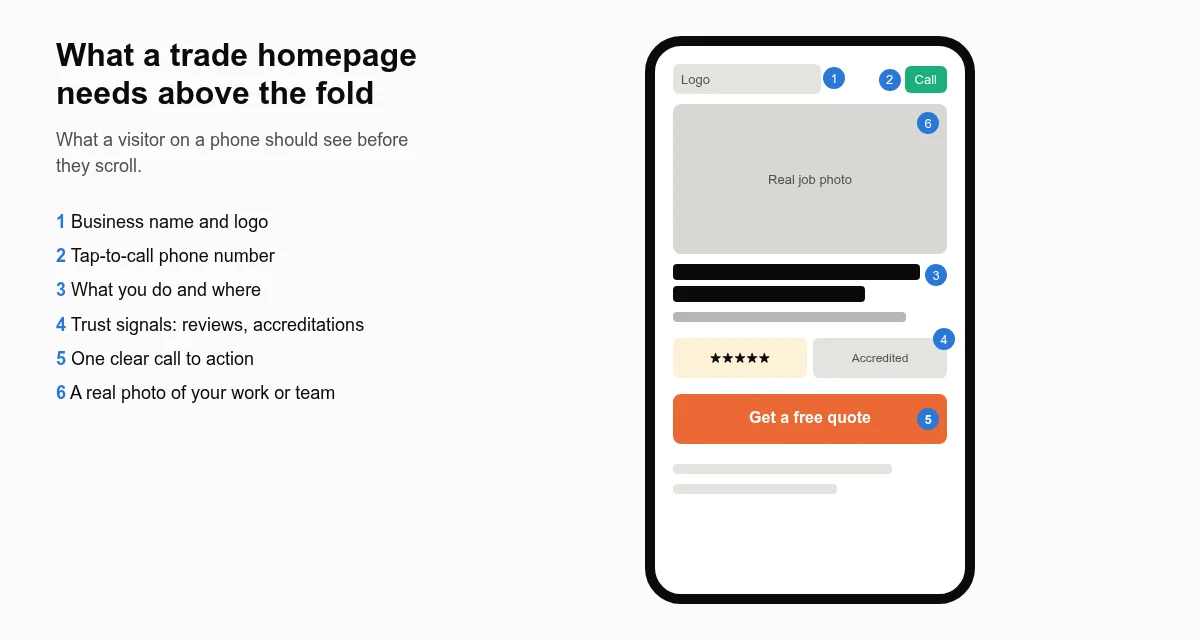
1. A clear statement of what you do and where
Your main heading should say it plainly: “Emergency plumber in Telford and Shrewsbury” beats “Quality you can trust” every time. It reassures the visitor they are in the right place and helps search engines understand your page.
2. A tap-to-call phone number on every page
Put your number at the top of every page and make it a tappable link so mobile visitors can call in one touch. Many trade enquiries are phone calls, especially for urgent jobs.
3. One obvious call to action
Decide what you most want visitors to do, usually call or request a quote, and make that button stand out. Too many competing buttons and links dilute it.
4. A short, simple enquiry form
Ask only for what you need to respond: name, phone or email, postcode and a short description. Long forms put people off. Let them attach a photo of the problem if that helps you quote. Then test the form regularly, because a form that silently fails is one of the most expensive website faults there is.
5. A page for each main service
A single “Services” page listing everything is not enough. Give each main service its own page, such as boiler installation, bathroom fitting or EICR testing, explaining what is involved, what affects the price, how long it takes and why customers choose you. Dedicated pages answer customers’ questions better and give Google a clear page to show for each type of search, as its SEO starter guide recommends: create helpful, people-first content organised around what people search for.
6. Clear service areas
List the towns and areas you cover, and for your most important areas, consider a dedicated page with genuinely local content, such as recent jobs in that town, travel times and local knowledge. Avoid copy-and-paste pages that only swap the town name; they help nobody. Our guide to local SEO for small businesses explains how service areas fit into your wider local presence.
7. Reviews and testimonials
Show genuine reviews near the top of your homepage and on service pages, with the customer’s first name and town where they are happy to share them. Link to your Google reviews so visitors can check them independently. Our guide to Google Business Profile for tradespeople covers how to build a steady flow of reviews.
8. Accreditations and insurance
If you are Gas Safe registered, NICEIC or NAPIT approved, TrustMark registered or a member of a trade association, show it clearly, with your registration number where relevant so customers can check it themselves. Mention your public liability insurance and any guarantees you offer. These are powerful trust signals for customers letting a stranger into their home.
9. Real photos of your work and team
Stock photos of smiling models in spotless overalls tell customers nothing. Real before-and-after photos, your liveried van and your team on site show you are a genuine local business. A small gallery for each service is ideal.
10. An about page with real people
People buy from people. A short story of how the business started, who will turn up at the door, and how long you have been trading builds confidence, especially for bigger jobs.
11. Fast loading on mobile
A slow site loses visitors before they see any of the above. Aim to pass Google’s Core Web Vitals on mobile; we explain what that means in our guide to Core Web Vitals for small businesses.
12. The legal and technical basics
- HTTPS with a valid SSL certificate, so browsers do not warn visitors the site is “Not secure”.
- A privacy notice explaining what you do with enquiry details, and cookie consent if you use analytics or advertising cookies. The Information Commissioner’s Office has guidance for small businesses.
- Your business details: trading name, contact details and, for limited companies, the registered company name and number.
- Ongoing care: updates, backups and security; see our WordPress maintenance checklist.
Quick self-check
| Question | If the answer is no |
|---|---|
| Can a visitor tell what you do and where within five seconds on a phone? | Rewrite your main heading |
| Can they call you with one tap from any page? | Add a tappable number to the header |
| Does each main service have its own page? | Create service pages, starting with your most profitable job |
| Are reviews and accreditations visible without hunting? | Move them near the top |
| Are the photos yours? | Replace stock images with job photos |
| Did your last test enquiry arrive? | Fix the form today |
Want a website that ticks every box?
We build trade websites with all 12 essentials as standard, then host, maintain and improve them for you. See our pages on web design for tradesmen, plumbers and electricians, find out how it works, or get in touch for a free review of your current site.