
When a homeowner types “plumber near me” or “electrician in Shrewsbury” into Google, the first thing they usually see is not a list of websites. It is a map with three businesses pinned on it, each with star ratings, opening hours and a call button. That block is known as the local map pack, and the listings in it come from Google Business Profile, Google’s free business listing service.
For tradespeople, a well-run Google Business Profile is often the single biggest source of new enquiries, ahead of social media and directories. This guide walks you through setting one up properly, explains how Google decides who appears in the map pack, and covers the weekly habits that keep you there.
What is Google Business Profile?
Google Business Profile (formerly Google My Business) is the free listing that controls how your business appears on Google Search and Google Maps. It holds your business name, phone number, service area, opening hours, photos, reviews and a short description. Customers can call you, request directions, visit your website or message you directly from the listing without ever clicking through to a website.
It costs nothing to create, and you do not need a website to have one. That said, a profile and a website work best together: the profile gets you seen, and the website builds the trust that turns a click into a booked job. If you are still weighing that up, our guide to web design for tradesmen explains what a trade website needs to do.
How Google decides who appears in the map pack
Google is unusually open about this. In its own help article, Tips to improve your local ranking on Google, it says local results are based mainly on three factors: relevance, distance and prominence.
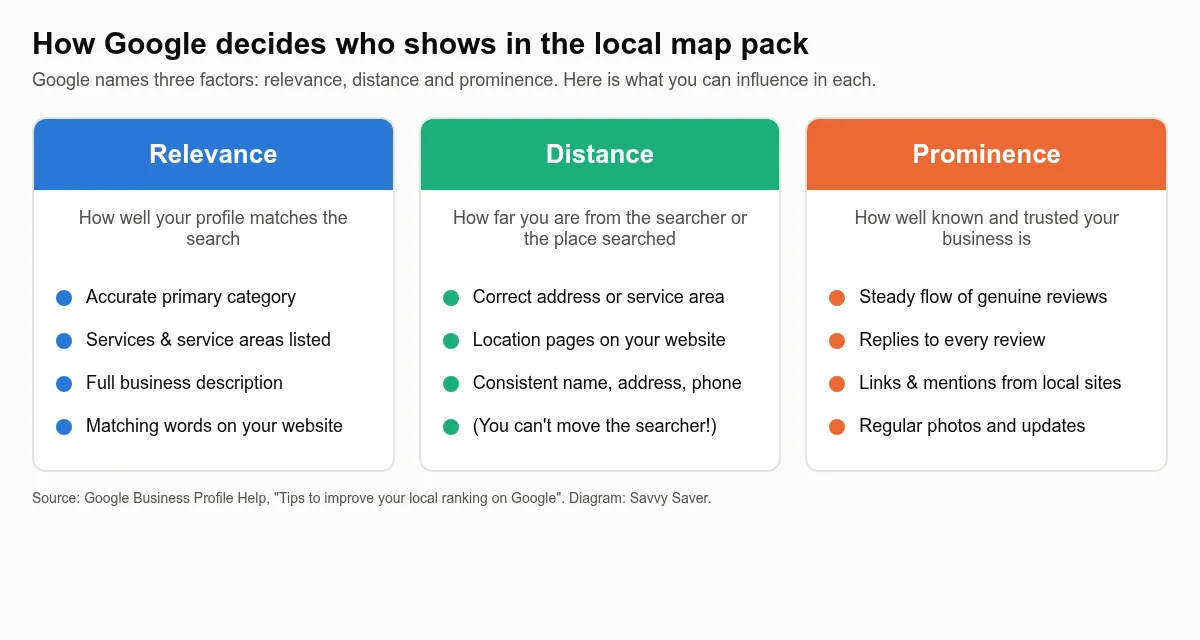
- Relevance is how well your profile matches what someone searched for. A complete profile with the right categories and services listed gives Google more to match against.
- Distance is how far your business is from the searcher, or from the place named in the search. You cannot change where a customer is standing, but you can make sure your address or service area is accurate.
- Prominence is how well known your business is. Google looks at reviews (both the number and the rating), links and mentions across the web, and your general presence online.
Google is also clear that you cannot pay to rank higher in these organic local results. Everything below is about doing the free basics thoroughly, which is exactly where most trade businesses fall short.
Step 1: Create or claim your profile
Before you create anything, search Google Maps for your business name and phone number. A profile may already exist, created automatically from public data or by a previous owner. If one does, claim it rather than starting a duplicate, because duplicates split your reviews and can get both listings suspended. Google explains both routes in Add or claim your Business Profile.
Use a Google account that the business owns and will keep long term, not a personal Gmail belonging to an apprentice or a former web designer. You can add other people as managers later without handing over ownership.
Verification
Google must verify that you really run the business before the profile goes live. The methods offered vary from business to business and Google decides which you see. They can include a phone call or text, email, a short video recording of your premises, tools and signage, or a live video call. For many trades the video option is now the most common. Have your van livery, tools, a business document and anything with your trading name ready to film in one continuous take.
Step 2: Get the core details exactly right
Business name
Use your real-world trading name, exactly as it appears on your van, invoices and website. Google’s guidelines for representing your business do not allow extra keywords or locations stuffed into the name, so “Smith Plumbing” is fine but “Smith Plumbing Emergency Plumber Telford Boiler Repair” is not. Profiles that break this rule can be edited by Google or suspended, and competitors do report them.
Address or service area
Most trades are what Google calls service-area businesses: you go to the customer rather than the customer coming to you. If customers do not visit your address, Google’s guidelines say you should not show it. Instead, hide the address and list the towns, cities or postcode areas you cover. Google lets you add up to 20 service areas, so pick the places you genuinely want work from rather than drawing an enormous radius.
If you do have premises customers visit, such as a showroom, trade counter or workshop with staffed opening hours, show the address and set accurate hours.
Phone number and website
Use a number that is answered, ideally a local landline or a mobile you will keep for years. Keep your business name, address (if shown) and phone number identical everywhere they appear online, from your website footer to directories like Checkatrade or Yell. Consistent details help Google trust that all those mentions are the same business, which feeds into prominence.
Step 3: Choose categories and services carefully
Your primary category is one of the strongest relevance signals you control. Choose the category that describes your main trade as specifically as possible, for example “Plumber”, “Electrician”, “Roofing contractor” or “Landscape designer”. You can then add additional categories for other genuine services, such as “Heating contractor” alongside “Plumber”.
Then fill in the services section. Add each job type you want enquiries for, with a short description: boiler servicing, bathroom installation, EICR testing, EV charger installation, fascia and soffit replacement. These descriptions give Google more context and give customers confidence that you do the specific job they need.
Step 4: Write a description that sells
You get up to 750 characters for your business description. Use them to answer the questions a customer is silently asking:
- What do you do, and what do you specialise in?
- Which areas do you cover?
- Why should they trust you? Qualifications, accreditations (Gas Safe, NICEIC, TrustMark), years trading and guarantees.
- What happens next? Free quotes, same-week visits, emergency call-outs.
Write it for people, not for search engines. Do not include links, special offers or prices that will go out of date.
Step 5: Add real photos of your work
Photos are often the deciding factor when someone compares three listings in the map pack. Upload a clear logo, a cover photo, and then a steady stream of genuine job photos: before-and-after shots, finished kitchens, rewired consumer units, new roofs, your liveried van and your team on site. Avoid stock images. Customers can spot them, and they tell a prospective client nothing about the quality of your work.
Aim to add a few new photos every month rather than fifty in one go and then nothing for a year. Fresh activity shows the business is active.
Step 6: Build a steady flow of genuine reviews
Reviews feed directly into prominence and are the biggest trust signal on your profile. The trick is to make asking a routine rather than an afterthought:
- Copy your profile’s “Ask for reviews” link from the Business Profile dashboard.
- Send it by text or WhatsApp the same day the job is finished, while the customer is happiest.
- Add it to your invoice email and your job completion paperwork.
- Reply to every review, good or bad, politely and within a few days.
Never buy reviews, write them yourself or offer discounts in exchange for them. Google’s policies prohibit it, and in the UK the Digital Markets, Competition and Consumers Act 2024 made fake reviews and concealed incentivised reviews unlawful from April 2025. A handful of honest four- and five-star reviews every month beats a sudden burst of suspicious ones.
When you get a negative review, reply calmly with the facts and an offer to put things right. Future customers read your reply as much as the complaint.
Step 7: Post updates and answer questions
Business Profile lets you publish short updates with a photo, much like a social post. Use them to show recent jobs, seasonal reminders (“Book your boiler service before winter”) or new services. Updates keep the profile looking active and give searchers another reason to choose you. Check the Q&A and messages regularly too, because an unanswered question is a lost enquiry.
Step 8: Connect your profile to a strong website
Your profile and your website reinforce each other. Google’s relevance signal draws on your website as well as your listing, and prominence draws on links and mentions that point to your site. A fast, mobile-friendly website with a page for each main service and each key town you cover gives Google far more to work with. We go deeper on this in our guide to local SEO for small businesses, and trade-specific advice is in our pages on websites for plumbers and websites for electricians.
Common mistakes that hold trade profiles back
| Mistake | Why it hurts | The fix |
|---|---|---|
| Keywords stuffed into the business name | Breaks Google’s guidelines and risks suspension | Use your real trading name only |
| Home address shown for a mobile trade | Against guidelines and a privacy risk | Hide the address and list service areas |
| Vague primary category | Weak relevance for the searches you want | Pick the most specific category for your main trade |
| No new photos for months | Profile looks inactive next to competitors | Add genuine job photos monthly |
| Only asking for reviews occasionally | Review count and freshness fall behind | Send your review link after every job |
| Different phone numbers across the web | Confuses Google and customers | Use one number everywhere |
A 15-minute weekly routine
- Send your review link to every customer whose job finished this week.
- Reply to any new reviews and messages.
- Upload two or three photos from this week’s jobs.
- Publish one short update.
- Check your hours are correct, especially around bank holidays.
Done consistently, this routine compounds. After a few months you will have more reviews, more photos and more activity than most of the competitors you share the map with.
Want it done for you?
If you would rather be on the tools than in a dashboard, our done-for-you local SEO service sets up and manages your Google Business Profile, builds your local pages and follows up every enquiry, all reported to you in plain English each month. See how it works or get in touch for a no-pressure chat.