
Most people who land on a small business website are on a phone, often on a patchy mobile signal, and they are comparing you with two or three competitors. If your page takes a long time to show anything, jumps around as it loads or ignores their taps, many will simply go back and call someone else. Google measures exactly these frustrations with a set of metrics called Core Web Vitals.
This guide explains what the three Core Web Vitals are, the scores Google treats as good, how to check your own site in a few minutes, and the fixes that usually make the biggest difference.
What are Core Web Vitals?
Core Web Vitals are three measurements Google uses to describe the real-world experience of using a web page. They are defined on Google’s web.dev guide to Web Vitals:
- Largest Contentful Paint (LCP) measures loading: how long it takes for the biggest thing on screen, usually the main image or headline, to appear.
- Interaction to Next Paint (INP) measures responsiveness: how quickly the page reacts visibly when someone taps a button, opens a menu or fills in a form. It replaced the older First Input Delay metric in March 2024.
- Cumulative Layout Shift (CLS) measures visual stability: how much the content jumps around while the page loads. It is the reason you sometimes tap the wrong button because an advert or image pushed everything down.
The scores to aim for
Google sorts each metric into three bands: good, needs improvement and poor. To pass, a page should hit the “good” threshold for at least 75% of real visits, on both mobile and desktop.
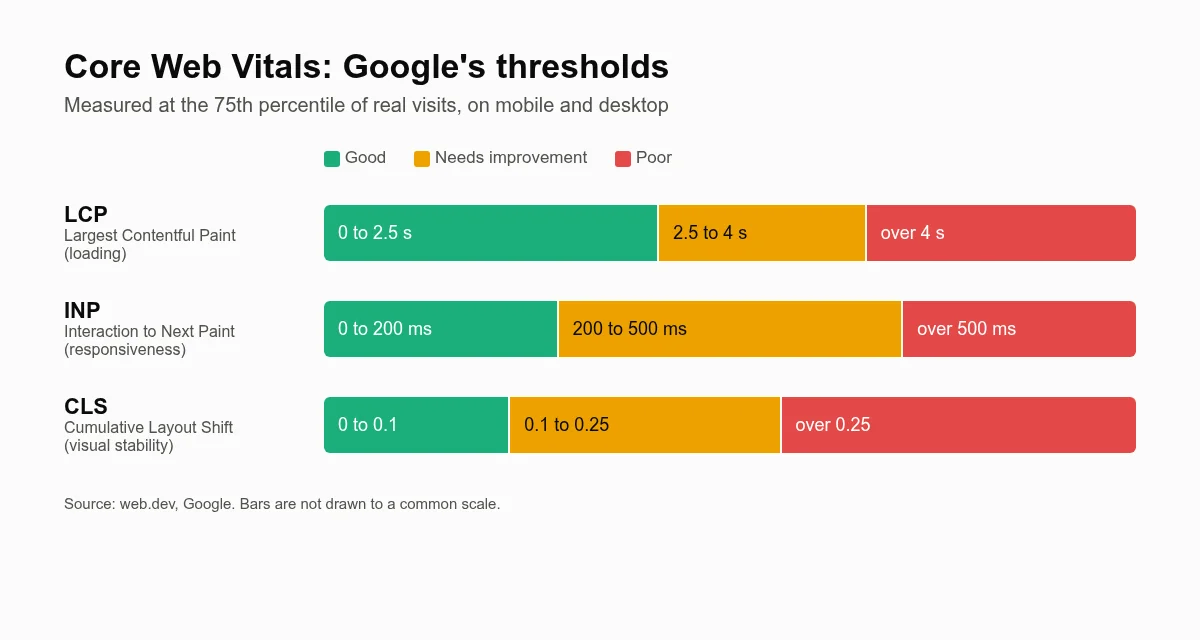
| Metric | Good | Needs improvement | Poor |
|---|---|---|---|
| LCP (loading) | 2.5 seconds or less | 2.5 to 4 seconds | Over 4 seconds |
| INP (responsiveness) | 200 milliseconds or less | 200 to 500 milliseconds | Over 500 milliseconds |
| CLS (visual stability) | 0.1 or less | 0.1 to 0.25 | Over 0.25 |
Do Core Web Vitals affect your Google rankings?
Yes, but probably less than you have been told. Google’s own Search Central documentation on Core Web Vitals says its ranking systems do use them, and recommends that site owners achieve good scores. It is equally clear that good scores alone do not guarantee top rankings: the relevance and usefulness of your content matter far more.
The bigger reason to care is your customers. A plumber’s page that loads in two seconds and lets someone tap “Call now” straight away will turn more visitors into enquiries than one that makes them wait, whatever its ranking. Speed is a conversion problem first and an SEO problem second.
How to test your own website for free
PageSpeed Insights
Go to PageSpeed Insights, paste in your home page address and run the test. You will see two kinds of results:
- Field data (“Discover what your real users are experiencing”) comes from real Chrome users over the last 28 days. This is what Google actually uses. Small sites with little traffic may not have enough data to show it.
- Lab data (the Lighthouse performance score out of 100) is a simulated test on a mid-range phone. It is useful for diagnosing problems, but the score itself is not a ranking factor and it can vary from one run to the next.
Always check the mobile tab first. Most local searches happen on phones, and mobile results are usually worse.
Google Search Console
If your site is set up in Google Search Console, the Core Web Vitals report groups your pages into good, needs improvement and poor, so you can see whether a problem affects one page or the whole site. It is free and worth setting up for any business website.
Why small business websites are often slow
In our experience, the same handful of causes come up again and again:
- Huge images. Photos uploaded straight from a phone or camera can be several megabytes each, when a properly sized web image is usually a small fraction of that.
- Bloated page builders and themes that load code for dozens of features you never use.
- Too many plugins and third-party scripts: chat widgets, review carousels, social feeds, tracking pixels and pop-ups, each adding work for the phone to do.
- Cheap, overcrowded hosting that takes a long time to send the first byte of the page.
- Image sliders at the top of the page, which delay the main content and often cause layout shift.
Fixes that make the biggest difference
To improve LCP (loading)
- Resize images to the size they are displayed at and serve them in a modern format such as WebP.
- Do not lazy-load the main image at the top of the page; it should load first. Lazy-load images further down instead.
- Use page caching and decent hosting so the server responds quickly.
- Limit custom web fonts to one or two families and weights.
To improve INP (responsiveness)
- Remove plugins and scripts you do not genuinely need.
- Delay non-essential third-party scripts, such as chat widgets, until after the page has loaded or until the visitor interacts.
- Keep menus and forms simple; heavy animation libraries slow down every tap.
To improve CLS (visual stability)
- Give every image and video a width and height so the browser can reserve space for it.
- Reserve space for cookie banners, embedded maps and review widgets rather than letting them push content down.
- Avoid inserting banners or pop-ups above existing content after the page has loaded.
A quick checklist for business owners
- Run your home page and your most important service page through PageSpeed Insights on mobile.
- Note which of LCP, INP and CLS are not in the green.
- Look at the largest images on those pages and check their file sizes.
- List every plugin, widget and tracking script, and ask whether each one earns its place.
- Re-test after each change, and check the field data again after 28 days.
Speed is one part of the local picture
A fast website works best alongside a strong local presence. If you have not already, read our guide to setting up your Google Business Profile as a tradesperson and our overview of local SEO for small businesses. If your current site was built years ago on a heavy theme, it may be quicker to rebuild than to patch; our page on web design for tradesmen explains what a modern, fast trade website includes.
Want us to check your site?
Every website we build and look after is designed to pass Core Web Vitals on mobile, with hosting, caching, image optimisation and updates handled for you. See how it works, find out about becoming a growth partner, or get in touch and we will tell you honestly what is slowing your site down.