
When someone searches for a plumber, electrician or roofer near them, your reviews are often the first thing they judge you on. They show beside your name in Google Maps and Search, and homeowners use them to decide who to call. Most tradespeople do great work and have plenty of happy customers. The problem is that happy customers rarely leave a review unless they are asked, and asked in a way that makes it easy.
This guide sets out a simple routine you can repeat after every job, how to reply to reviews, and the rules you need to stay within.
Why reviews matter so much for trades
Google says that reviews can help your business stand out and give potential customers useful information, and that high-quality, positive reviews can improve your business’s visibility. Its local ranking help also lists prominence, which reviews feed into, alongside relevance and distance. For a trade business, reviews do three jobs at once:
- Trust: a new customer is letting you into their home. Recent, detailed reviews from neighbours reassure them.
- Visibility: a steady flow of genuine reviews supports your place in the local map results.
- Information: customers often mention the job and the town, for example “replaced our boiler in Shrewsbury”, which tells the next person you do that work in their area.
If you have not set up your profile properly yet, start with our Google Business Profile guide for tradespeople.
A five-step routine for every job
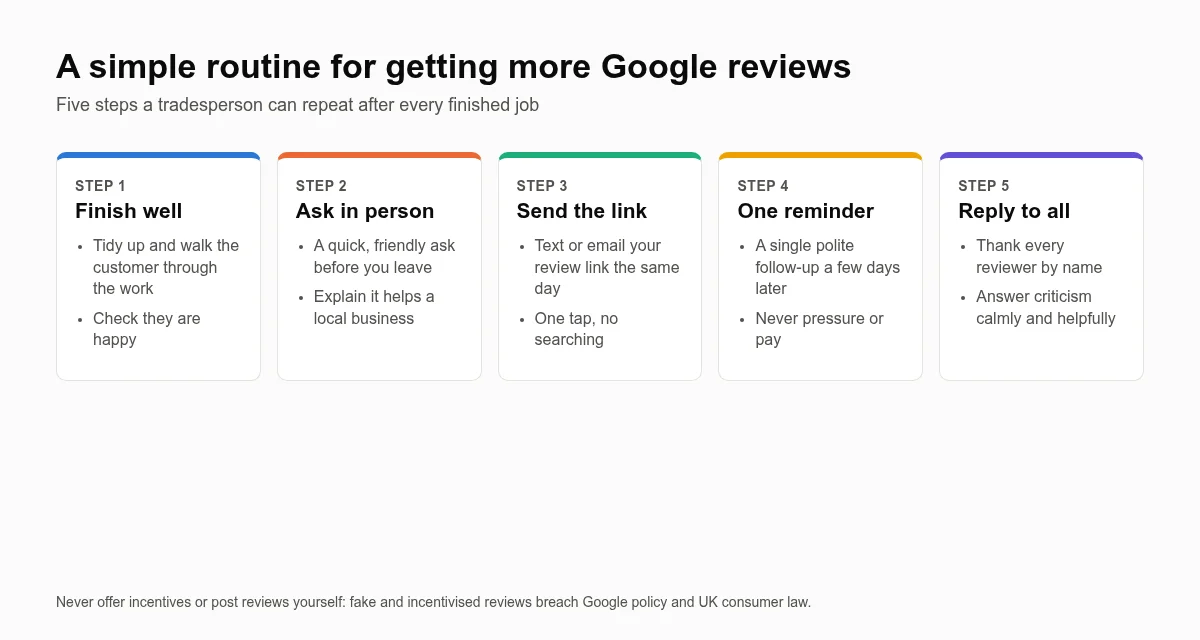
1. Finish the job well
The best time to ask is the moment the customer is happiest: the job is done, the area is tidy and you have shown them what you did. Walk them through the work, explain anything they need to know, and check they are pleased before you mention reviews.
2. Ask in person
A face-to-face ask works far better than an automated email weeks later. Keep it short and honest: “If you’re happy with the job, a quick Google review would really help a small local business like mine. I’ll text you the link so it only takes a minute.” Do not ask only the customers you think will leave five stars; ask everyone.
3. Send your review link the same day
Google lets you get a short link that takes customers straight to the review box for your profile. You will find it in your Business Profile under the option to ask for reviews. Save it in your phone so you can text it before you have even driven away. Google’s own tips to get more reviews explain how to find and share it.
Good places to share the link:
- a text or WhatsApp message straight after the job
- the bottom of your invoice or receipt email
- a QR code on the back of your business card or a leave-behind card
- a “leave us a review” button on your website
4. Send one polite reminder
People mean to do it and forget. One friendly follow-up a few days later is fine. More than that starts to feel like pressure, so leave it there.
5. Reply to every review
Replies show future customers that you care and that a real person runs the business. Thank people by name and mention the job if you can. It takes a minute and builds trust with everyone who reads it later.
How to handle a bad review
Every business gets one eventually. How you reply matters more than the review itself, because prospective customers read your response.
- Wait before you reply. Do not respond while you are angry.
- Stay calm and factual. Thank them for the feedback, acknowledge the problem, and avoid arguing about details in public.
- Offer to put it right offline. Give a phone number or email so you can sort it out.
- Never share personal details about the customer or the job in your reply.
- Report reviews that break the rules, such as spam, a review from someone who was never a customer, or offensive content. Google may remove reviews that breach its policies; it will not remove a review just because it is negative.
The rules: what you must not do
It can be tempting to speed things up. Don’t. Google’s prohibited and restricted content policy bans fake engagement, including reviews posted by the business owner or staff, reviews written in exchange for an incentive, and selectively asking only happy customers in a way designed to manipulate ratings. Google can remove reviews and restrict profiles that break the rules.
In the UK, fake reviews are also a legal issue. The Digital Markets, Competition and Consumers Act 2024 made it a banned practice to commission or publish fake reviews, or to give a false or misleading impression with consumer reviews. The Competition and Markets Authority has published guidance on fake reviews for businesses. In practice, that means:
| Do | Don’t |
|---|---|
| Ask every customer for an honest review | Offer discounts, prize draws or gifts in exchange for reviews |
| Make it easy with a direct link or QR code | Write reviews yourself or ask friends and family to |
| Reply politely to good and bad reviews | Buy reviews or use review-swapping groups |
| Report reviews that genuinely break the rules | Hide or filter out negative feedback on your own website |
Make your reviews work on your website too
Reviews should not live only on Google. Showing recent reviews on your homepage and service pages reassures visitors who land on your site directly. It is one of the essentials in our list of what a trade website should include. Make sure the page loads quickly on a phone, too; our guide to Core Web Vitals explains why.
Want this done for you?
Savvy Saver builds and looks after websites for UK tradespeople, and our local SEO service includes setting up your Google Business Profile and a simple review routine you can stick to. Read more about local SEO for small businesses, see how it works, or get in touch.